Google vs Microsoft: Which Is Better in 2026?
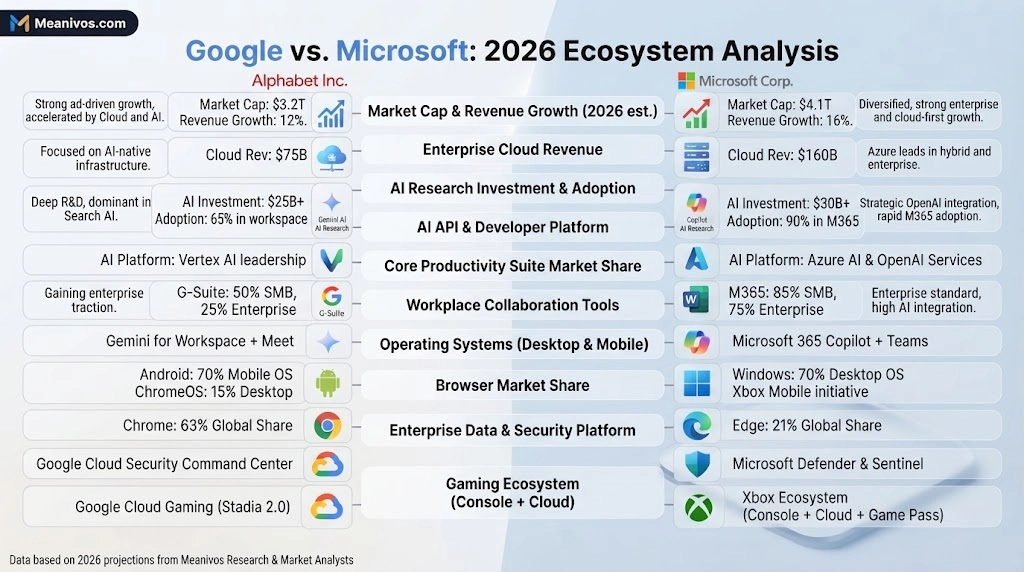
Google and Microsoft are two of the biggest names in technology, but Google vs Microsoft is not a simple one-on-one battle.
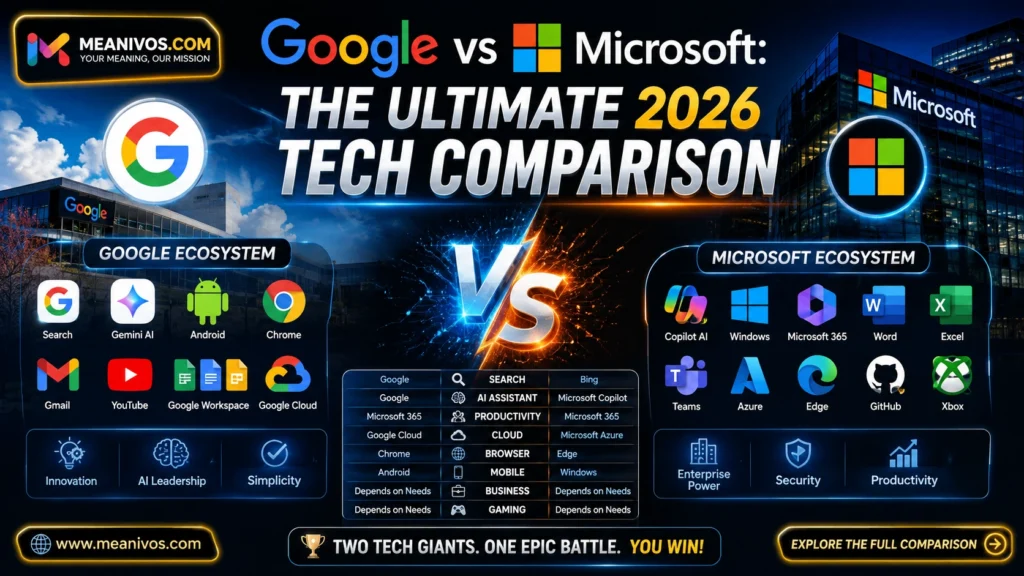
The Google is deeply connected to Search, Android, Chrome, Gmail, YouTube, Maps, Google Workspace, Google Cloud and Gemini. Microsoft is deeply connected to Windows, Microsoft 365, Word, Excel, PowerPoint, Outlook, Teams, Azure, GitHub, Xbox and Copilot.
That is why the right answer depends on what you actually need.
Google is generally the better choice for search, Android, consumer internet services, browser-first collaboration and Google’s consumer AI ecosystem. Microsoft is generally stronger for Windows, desktop productivity, Excel, enterprise workflows, Microsoft 365 and organisations already invested in Microsoft’s technology stack.
AI has made the comparison even more interesting. Google is integrating Gemini into its products and browser experience, while Microsoft is embedding Copilot into Microsoft 365 and its broader workplace ecosystem. Google’s Gemini in Chrome can use the content of the current browser tab and, where supported, multiple open tabs; availability varies by region, account and device.
So, which is better?
There is no universal winner. The better ecosystem is the one that fits your workflow, devices, clients, software and goals.
Google vs Microsoft: Quick Answer
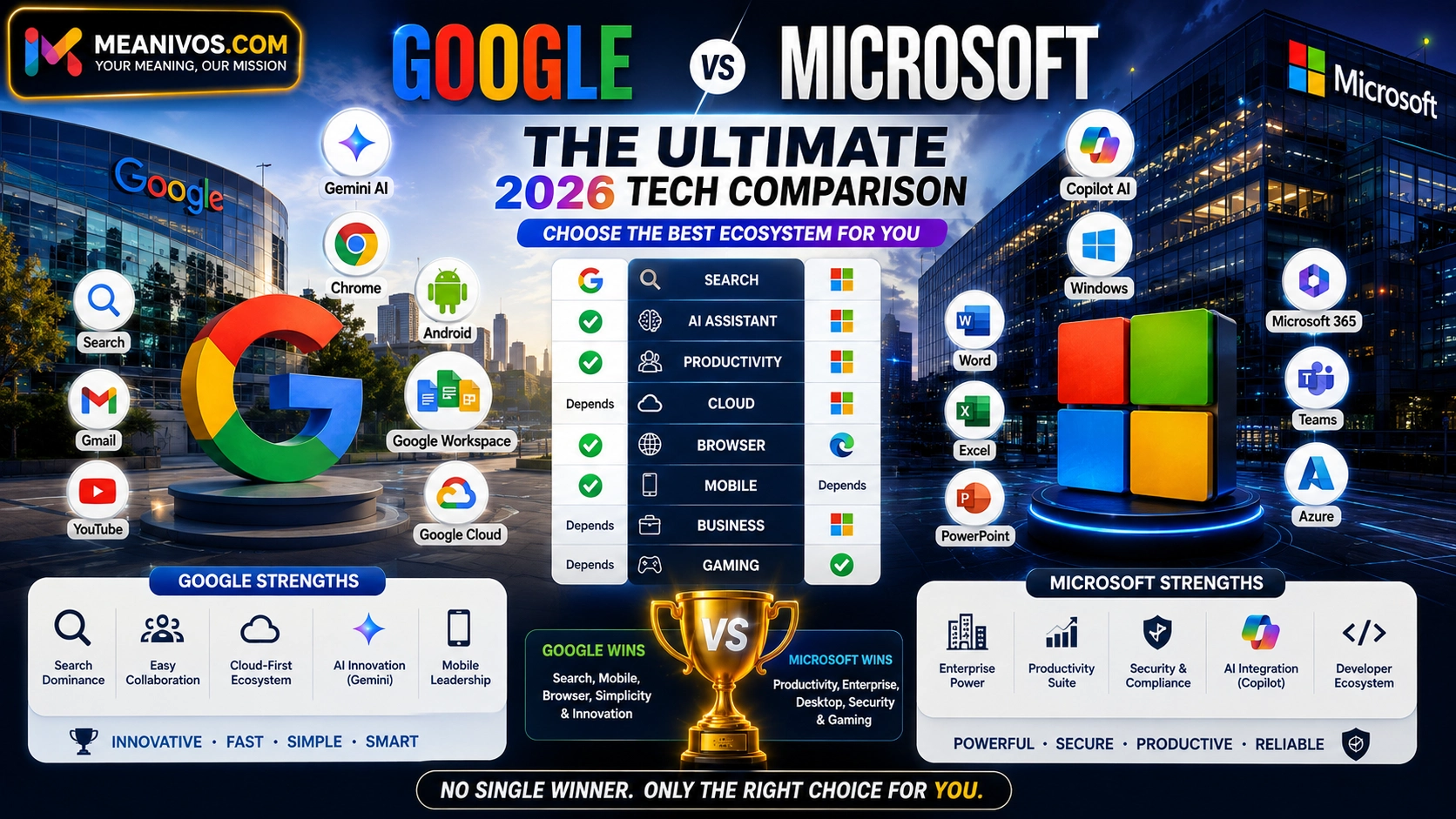
If you only need the short answer, use this table:
| Category | Better choice |
| Web search | |
| Gmail and consumer email | |
| Android | |
| YouTube | |
| Maps | |
| Browser-based collaboration | |
| Windows PCs | Microsoft |
| Word | Microsoft |
| Advanced Excel | Microsoft |
| PowerPoint | Microsoft |
| Teams | Microsoft |
| Enterprise productivity | Microsoft |
| Desktop productivity | Microsoft |
| Cloud computing | Depends on workload |
| AI assistants | Depends on ecosystem |
| Students | Depends on workflow |
| Freelancers | Depends on clients |
| Developers | Depends on technology stack |
| Gaming | Microsoft |
| Overall consumer ecosystem | |
| Overall enterprise ecosystem | Microsoft |
The important point is that Google and Microsoft are not direct substitutes in every category.
Google and Microsoft Are Not the Same Type of Competitor
A common mistake is to treat Google and Microsoft as though they sell the same products.
They don’t.
Google’s ecosystem is strongly connected to the internet and consumer technology:
- Google Search
- Gmail
- Chrome
- Android
- YouTube
- Google Maps
- Google Drive
- Google Docs
- Google Sheets
- Google Slides
- Google Meet
- Google Workspace
- Google Cloud
- Gemini
- Pixel
Microsoft’s ecosystem is strongly connected to desktop computing, productivity and enterprise technology:
- Windows
- Microsoft 365
- Word
- Excel
- PowerPoint
- Outlook
- OneDrive
- Teams
- Edge
- Bing
- Azure
- Copilot
- Surface
- Xbox
- GitHub
Microsoft’s current Microsoft 365 business offerings, for example, connect Outlook, Word, Excel, PowerPoint, Teams and OneDrive, with different plans adding desktop applications, security and device-management capabilities.
So the broader Google vs Microsoft question is really an ecosystem comparison.
Google vs Microsoft: At-a-Glance
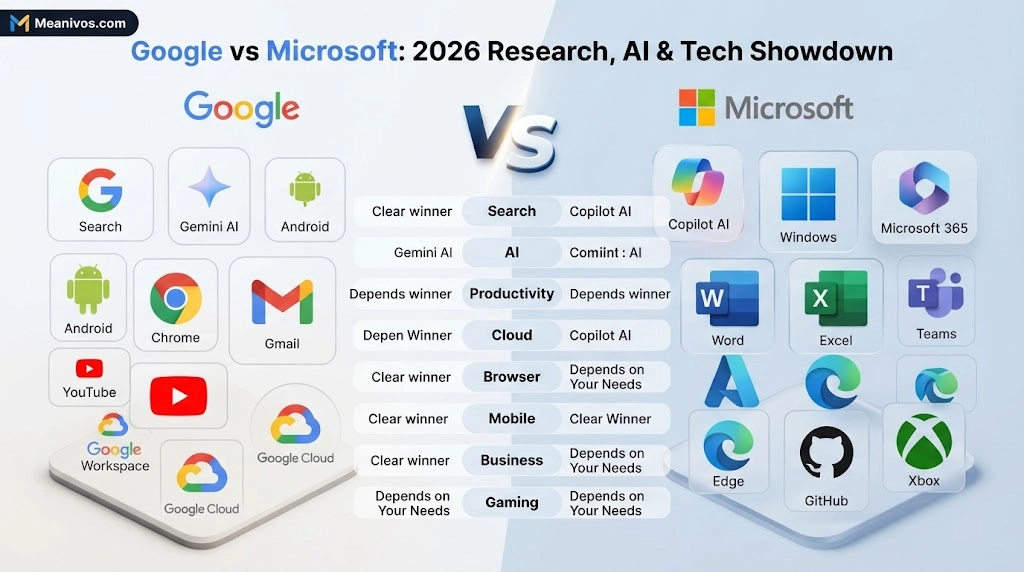
Think of the two companies this way:
Google is strongest around the open internet
Google has built an enormous consumer ecosystem around:
Search → Chrome → Gmail → YouTube → Android → Maps → Drive → Workspace → Gemini
This makes Google especially attractive to people whose work and personal life happen primarily online.
Microsoft is strongest around professional computing
Microsoft has built a powerful ecosystem around:
Windows → Microsoft 365 → Office → Teams → Azure → security → enterprise applications
This gives Microsoft a major advantage in organisations that rely on Windows and professional desktop software.
Google tends to be better for:
- Search
- Android
- Gmail
- YouTube
- Browser-first workflows
- Real-time collaboration
- Consumer internet services
- Cloud-native environments
- Google-centric users
Microsoft tends to be better for:
- Windows
- Excel
- Word
- PowerPoint
- Outlook
- Teams
- Desktop applications
- Enterprise administration
- Complex business workflows
- Microsoft-centric organisations
Google vs Microsoft in Search
If the question is specifically Google Search vs Bing, the answer is much clearer.
Google wins search.
StatCounter data cited in the supplied research showed Google with a dominant worldwide search share in June 2026, while Bing remained a distant second. The gap was also particularly large in Pakistan.
Google’s search ecosystem extends beyond a traditional list of web links. It connects search with:
- Images
- Maps
- News
- Shopping
- YouTube
- Local results
- Knowledge information
- AI-powered search experiences
- Android
Bing remains important because of Microsoft’s integration with Windows, Edge and its AI ecosystem.
But if your only question is:
“Should I use Google Search or Bing?”
Google is the stronger default for most users.
Search winner: Google
Google vs Microsoft in AI
AI is the category where the competition becomes much harder to call.
Google has Gemini.
Microsoft has Copilot.
But comparing Gemini and Copilot only as chatbots misses the larger competition.
Google is integrating Gemini into its broader consumer and productivity ecosystem. Gemini in Chrome, for example, can use the content of the current browser tab and can work across multiple open tabs in supported environments. Google has also expanded Gemini in Chrome into additional regions during 2026.
Microsoft’s advantage is different.
Copilot is deeply connected to Microsoft’s productivity environment. Microsoft 365 Copilot can work within Microsoft 365 applications and organisational workflows, depending on the user’s licence and configuration.
Gemini is especially attractive if you use:
- Google Search
- Chrome
- Android
- Gmail
- Google Docs
- Google Sheets
- Google Workspace
- YouTube
- Google’s consumer AI services
Copilot is especially attractive if you use:
- Windows
- Word
- Excel
- PowerPoint
- Outlook
- Teams
- Microsoft 365
- Microsoft enterprise services
AI winner: No universal winner
The smartest rule is simple:
Choose the AI assistant that is closest to the applications and information you already use.
Google Gemini vs Microsoft Copilot
| Feature | Google Gemini | Microsoft Copilot |
| Google ecosystem | Excellent | Limited |
| Microsoft ecosystem | Limited | Excellent |
| Android | Excellent | Not its core advantage |
| Chrome | Strong | Edge-focused |
| Gmail | Strong | Outlook-focused |
| Google Docs | Strong | Word-focused |
| Google Sheets | Strong | Excel-focused |
| Google Slides | Strong | PowerPoint-focused |
| Word | Limited compared with Copilot | Excellent |
| Excel | Limited compared with Copilot | Excellent |
| PowerPoint | Limited compared with Copilot | Excellent |
| Teams | Not its core advantage | Excellent |
| Windows | Growing integration | Excellent |
| Enterprise Microsoft data | Not its core advantage | Excellent |
| Browser research | Strong | Strong |
The key takeaway is not that one AI is always smarter.
It is that ecosystem integration matters.
Google Workspace vs Microsoft 365
This is arguably the most useful Google-vs-Microsoft comparison for businesses.
Google Workspace includes tools such as:
- Gmail
- Drive
- Docs
- Sheets
- Slides
- Meet
- Chat
- Calendar
Microsoft 365 includes:
- Outlook
- Word
- Excel
- PowerPoint
- OneDrive
- Teams
- SharePoint
- Other Microsoft business services
Google’s advantage is its browser-first approach.
A team can work on a document, spreadsheet or presentation together and share it through Google’s cloud environment. Google also integrates Meet directly with Docs, Sheets and Slides.
Microsoft’s advantage is the depth of its professional desktop applications and enterprise environment. Microsoft 365 Business Standard, for example, includes desktop versions of Outlook, Word, Excel, PowerPoint and OneNote, while Microsoft 365 business plans can also connect email, Teams, cloud storage and security capabilities.
Choose Google Workspace if:
- You work mainly in a browser.
- Your team collaborates constantly.
- You prefer Gmail.
- You use Google Drive.
- You want simple real-time document collaboration.
- Your organisation is cloud-first.
- Your team uses Google services heavily.
Choose Microsoft 365 if:
- You rely on Word.
- You use Excel heavily.
- You create complex PowerPoint presentations.
- Your organisation uses Outlook.
- You rely on Teams.
- Your employees use Windows.
- You need deeper enterprise administration.
- Your clients regularly exchange Microsoft Office files.
Productivity verdict
Google wins for simplicity and browser-based collaboration.
Microsoft wins for desktop depth and complex professional workflows.
Google Cloud vs Microsoft Azure
Cloud computing is another major battleground.
Google Cloud and Microsoft Azure are both major cloud platforms, but their strengths can differ according to workload.
Google Cloud can be attractive for:
- Data Analytics
- AI and machine learning
- Cloud-native applications
- Kubernetes-based environments
- Data-intensive workloads
- Google’s AI ecosystem
Azure can be attractive for:
- Microsoft-heavy organisations
- Windows environments
- Enterprise applications
- Microsoft 365 integration
- Microsoft identity ecosystems
- Organisations already invested in Azure
That means there is no honest universal answer to:
“Google Cloud or Azure—which is better?”
A company already using Microsoft’s enterprise infrastructure may find Azure the more natural fit.
A team building a cloud-native, data-heavy or Google-centric environment may prefer Google Cloud.
Cloud winner: Depends on workload
Google Chrome vs Microsoft Edge
Chrome and Edge are both Chromium-based browsers, so the choice often comes down to ecosystem integration.
Chrome is particularly attractive if you use:
- Google Search
- Gmail
- Google Drive
- YouTube
- Android
- Google Account services
- Google Workspace
Edge is particularly attractive if you use:
- Windows
- Microsoft 365
- Microsoft services
- Bing
- Copilot
- Enterprise Microsoft management
Google is also pushing Gemini deeper into Chrome. In supported environments, Gemini can use webpage context and multiple open tabs to help with research and browsing tasks.
Browser verdict
Chrome is the natural choice for Google-centric users.
Edge is the natural choice for Microsoft-centric Windows users.
Neither is objectively better for every person.
- Explore More: https://meanivos.com/tear-vs-tare/
Android vs Windows
This is not really a fair head-to-head because Android is primarily a mobile operating system while Windows is primarily a desktop operating system.
Still, it highlights the different strengths of the companies.
Google dominates mobile
Google’s Android ecosystem connects with:
- Google Play
- Gmail
- Maps
- Chrome
- YouTube
- Photos
- Gemini
- Google services
Microsoft dominates desktop computing
Windows remains central to:
- Business PCs
- Desktop software
- Professional applications
- Enterprise computing
- Gaming PCs
Winner
Mobile: Google
Desktop: Microsoft
Google vs Microsoft for Students
Students do not necessarily need to choose one ecosystem exclusively.
Google may be better for students who:
- Use Chromebooks.
- Prefer Google Docs.
- Work on group assignments.
- Use Android phones.
- Collaborate online.
- Work mostly in a browser.
- I want simple cloud storage.
Microsoft may be better for students who:
- Need Word.
- Use Excel.
- Create PowerPoint presentations.
- Study finance or business.
- Need advanced spreadsheet functions.
- Work with professional Office files.
- Need desktop applications.
Student verdict
Choose based on your course and workflow, not the brand name.
For basic writing and collaboration, Google can be extremely convenient.
For advanced spreadsheets, presentations and professional document formatting, Microsoft may have the edge.
Google vs Microsoft for Freelancers
Freelancers should think about one factor that many comparison articles overlook:
What do your clients use?
A freelancer working with startups and remote teams may receive Google Docs, Sheets and Drive links every day.
Another freelancer working with corporate clients may constantly receive Word documents, Excel spreadsheets, PowerPoint presentations and Teams invitations.
Google can be better for:
- Content writers
- Remote teams
- Social media workers
- Startup freelancers
- Browser-first workflows
- Collaborative projects
Microsoft can be better for:
- Financial freelancers
- Business consultants
- Virtual assistants
- Corporate contractors
- Excel specialists
- PowerPoint designers
- Enterprise clients
Freelancer verdict
Choose the ecosystem your clients actually use.
That can save more time than choosing based on brand loyalty.
Google vs Microsoft for Business
The enterprise comparison is more complicated.
Microsoft has a particularly deep business stack:
Windows → Microsoft 365 → Teams → Azure → identity → security → enterprise applications
Google’s business ecosystem follows a different model:
Gmail → Drive → Docs → Meet → Chrome → Workspace → Cloud → Gemini
Microsoft’s business offerings include desktop Office applications, Teams, OneDrive, business email and security features, depending on the plan.
Google is particularly compelling for cloud-first organisations and teams that prioritise browser-based collaboration.
Microsoft may be better for:
- Large enterprises
- Windows-heavy organisations
- Office-heavy workflows
- Complex IT environments
- Enterprise administration
- Excel-intensive businesses
Google may be better for:
- Startups
- Distributed teams
- Browser-first companies
- Google-centric organisations
- Simple collaboration workflows
- Cloud-first businesses
Business verdict
Microsoft generally has the advantage in complex enterprise environments.
Google is highly attractive for cloud-first and collaboration-heavy organisations.
Google vs Microsoft for Developers
Developers can benefit from both ecosystems.
Google offers technologies and platforms such as:
- Google Cloud
- Android
- Firebase
- Chrome
- Kubernetes-related technology
- AI and machine-learning services
Microsoft offers:
- Azure
- GitHub
- Visual Studio
- Windows
- .NET
- Power Platform
- Copilot
A developer building Android applications naturally interacts with Google’s ecosystem.
A developer building .NET applications for Microsoft environments may naturally prefer Microsoft’s stack.
Developer verdict
There is no universal winner. Your technology stack matters more than the company name.
Google vs Microsoft for Everyday Users
For ordinary internet users, Google can feel more central to everyday online life.
A typical Google-centric setup might look like:
Search + Gmail + Chrome + YouTube + Maps + Drive + Android + Photos + Gemini
A Microsoft-centric setup might look like:
Windows + Word + Excel + PowerPoint + Outlook + OneDrive + Edge + Xbox + Copilot
If most of your activity happens on the internet and mobile devices, Google may feel more natural.
If most of your activity happens on a Windows PC and involves documents, spreadsheets or professional software, Microsoft may feel more natural.
Everyday-user verdict
Google generally has the broader consumer-internet advantage.
Advantages of Google
1. Search
Google remains the dominant global search ecosystem, making it the obvious choice for conventional web search.
2. Consumer ecosystem
Search, YouTube, Android, Chrome, Gmail and Maps work together across a wide range of everyday activities.
3. Collaboration
Google Workspace is designed around cloud-based collaboration.
4. AI integration
Gemini is increasingly being integrated into Google’s broader products and browser experience. Google’s 2026 Chrome updates show how the company is moving AI closer to everyday browsing.
5. Android
Google has an enormous advantage in mobile software.
6. Simplicity
For many users, Google’s browser-first tools are easy to start using and share.
Advantages of Microsoft
1. Windows
Windows remains one of Microsoft’s most important ecosystem anchors.
2. Office applications
Word, Excel and PowerPoint remain central to professional work.
3. Enterprise ecosystem
Microsoft connects productivity, identity, security, devices, collaboration and cloud infrastructure.
4. Azure
Azure gives Microsoft a major position in cloud computing and enterprise infrastructure.
5. Copilot
Microsoft’s AI strategy benefits from embedding Copilot into products people already use for work.
6. Gaming
Xbox gives Microsoft a major consumer entertainment ecosystem.
7. Developer ecosystem
GitHub, Visual Studio, Azure and .NET give Microsoft substantial developer reach.
Disadvantages of Google
Google is powerful, but it is not perfect.
Potential drawbacks include:
- Some professional users prefer desktop Office applications.
- Advanced enterprise requirements may favour Microsoft.
- Browser-first workflows may not suit every specialised professional task.
- Organisations may have concerns about changing product strategies or services.
- Some business workflows remain strongly tied to Microsoft formats and applications.
Disadvantages of Microsoft
Microsoft also has trade-offs.
Potential drawbacks include:
- Greater product complexity.
- A steeper learning curve for some users.
- Enterprise administration can be complicated.
- Microsoft has many overlapping products and services.
- Some advanced AI capabilities depend on specific plans or licences.
This creates one of the clearest differences between the ecosystems:
Google often wins through simplicity. Microsoft often wins through depth.
Is Google Better Than Microsoft?
If “better” means search, Android, Gmail, YouTube, consumer internet services and browser-first collaboration, Google has a strong advantage.
If “better” means Windows, Word, Excel, PowerPoint, Teams, enterprise productivity and complex professional workflows, Microsoft has the advantage.
So the honest answer is:
Google is better for some users. Microsoft is better for others.
Is Microsoft Better Than Google?
Microsoft is often the better choice when your digital life revolves around:
- Windows
- Word
- Excel
- PowerPoint
- Outlook
- Teams
- Azure
- Enterprise security
- Corporate IT
Google is often the better choice when your digital life revolves around:
- Search
- Gmail
- Chrome
- Android
- YouTube
- Drive
- Docs
- Google Workspace
- Gemini
The deciding factor is your workflow.
Can You Use Google and Microsoft Together?
Yes—and many people should.
You do not have to choose one company for everything.
For example, you can use:
- Google Search + Windows
- Chrome + Microsoft 365
- Gmail + Word
- Android + Windows
- Google Drive + Excel
- YouTube + Xbox
- Gemini + Microsoft applications
- Copilot + Google services
A hybrid setup can be more practical than trying to live entirely inside one ecosystem.
For example, a freelancer might use Chrome, Gmail and Google Drive for everyday work while still using Excel and PowerPoint for clients.
That is not a failure to choose.
It is often the most efficient setup.
Google vs Microsoft: Which Is Better for You?
Use this simple decision framework.
Choose Google if you want:
Search + Android + Chrome + Gmail + YouTube + Maps + browser collaboration + Google’s consumer AI ecosystem.
Choose Microsoft if you want:
Windows + Word + Excel + PowerPoint + Outlook + Teams + enterprise software + Azure + professional desktop workflows.
Choose both if:
- Your clients use different ecosystems.
- You switch between personal and professional workflows.
- You need Excel but prefer Gmail.
- You use Android but work on Windows.
- You use Google services personally and Microsoft services professionally.
People Also Ask
A:Neither company is universally better. Google generally has the advantage in search, Android and consumer internet services, while Microsoft is particularly strong in Windows, Office, enterprise productivity and professional workflows.
A:It depends on the student’s work. Google is convenient for browser-based collaboration and Google Docs, while Microsoft is often stronger for Word, Excel, PowerPoint and advanced desktop productivity.
A:Google Workspace is particularly strong for simple browser-based collaboration. Microsoft 365 is particularly strong for desktop Office applications, Excel and complex professional workflows.
A:There is no universal winner. Gemini is especially attractive inside Google’s ecosystem, while Copilot has a strong advantage inside Windows, Microsoft 365 and enterprise workflows.
A:Not always. Google can be excellent for cloud-first and collaborative organisations, while Microsoft is often stronger for Windows-heavy companies, enterprise administration and Office-based workflows.
Final Verdict
So, Google vs Microsoft—which is better in 2026?
The answer depends on the category.
Google wins for:
Search, Android, Chrome, Gmail, YouTube, Maps, consumer internet services and browser-based collaboration.
Microsoft wins for:
Windows, Word, Excel, PowerPoint, Outlook, Teams, enterprise productivity and complex professional workflows.
AI:
Too close to call universally.
Gemini benefits from Google’s search, browser, consumer and Workspace ecosystem, while Copilot benefits from Microsoft’s deep integration with Windows, Microsoft 365 and enterprise workflows. Google’s Gemini in Chrome and Microsoft’s Microsoft 365 AI integrations illustrate how both companies are turning AI into an ecosystem feature rather than treating it as a standalone chatbot.
Search:
Google.
Productivity:
Microsoft for advanced desktop work; Google for simple browser collaboration.
Enterprise:
Microsoft generally has the stronger all-around enterprise ecosystem.
Consumer technology:
Google generally has the broader consumer-internet ecosystem.